Pretty much what it says on the tin, but for more context. My friends and I use Discord to play D&D and other TTRPGs. We also use it to send memes and just have conversations. We mostly do the chat, text, images, gifs, etc. But we also use the voice and video chat pretty regularly too. Screen share sometimes as well. So I’d like to try to find something that has all those features if possible.
The new ID or facial recognition requirement they are implementing is a deal breaker for a few of us, and so if I can set up some kind of alternative to make it a non-issue, I’d like to.
I’m running Ubunutu 22.04 LETS, AMD 3700X, 64GBRAM, 10x 6TB HDD, and and 2 4TB NVmE. Have a 2gb up/down internet connection. So I don’t think we should have any issues making it work smoothly for 7 people.
You must log in or # to comment.
Acronyms, initialisms, abbreviations, contractions, and other phrases which expand to something larger, that I’ve seen in this thread:
Fewer Letters More Letters PIA Private Internet Access brand of VPN SSH Secure Shell for remote terminal access VPN Virtual Private Network XMPP Extensible Messaging and Presence Protocol (‘Jabber’) for open instant messaging
3 acronyms in this thread; the most compressed thread commented on today has 15 acronyms.
[Thread #79 for this comm, first seen 9th Feb 2026, 22:30] [FAQ] [Full list] [Contact] [Source code]
The Mastodon founder, Eugen Rochko, has just announced that “We’ve moved our internal communications from Discord to Zulip at Mastodon”.
https://mastodon.social/@Gargron/116041405748460511
Zulip is probably more focused toward work than TTRPGs, but it can’t hurt to try it. (I haven’t tried it personally, yet.) It is self-hostable.
Zulip is great… on a PC. On mobile is a totally different thing, and not in a good way. 😕
What was the problem with Zulip on mobile did you have?
I only use it for text chat, so I’m curious.
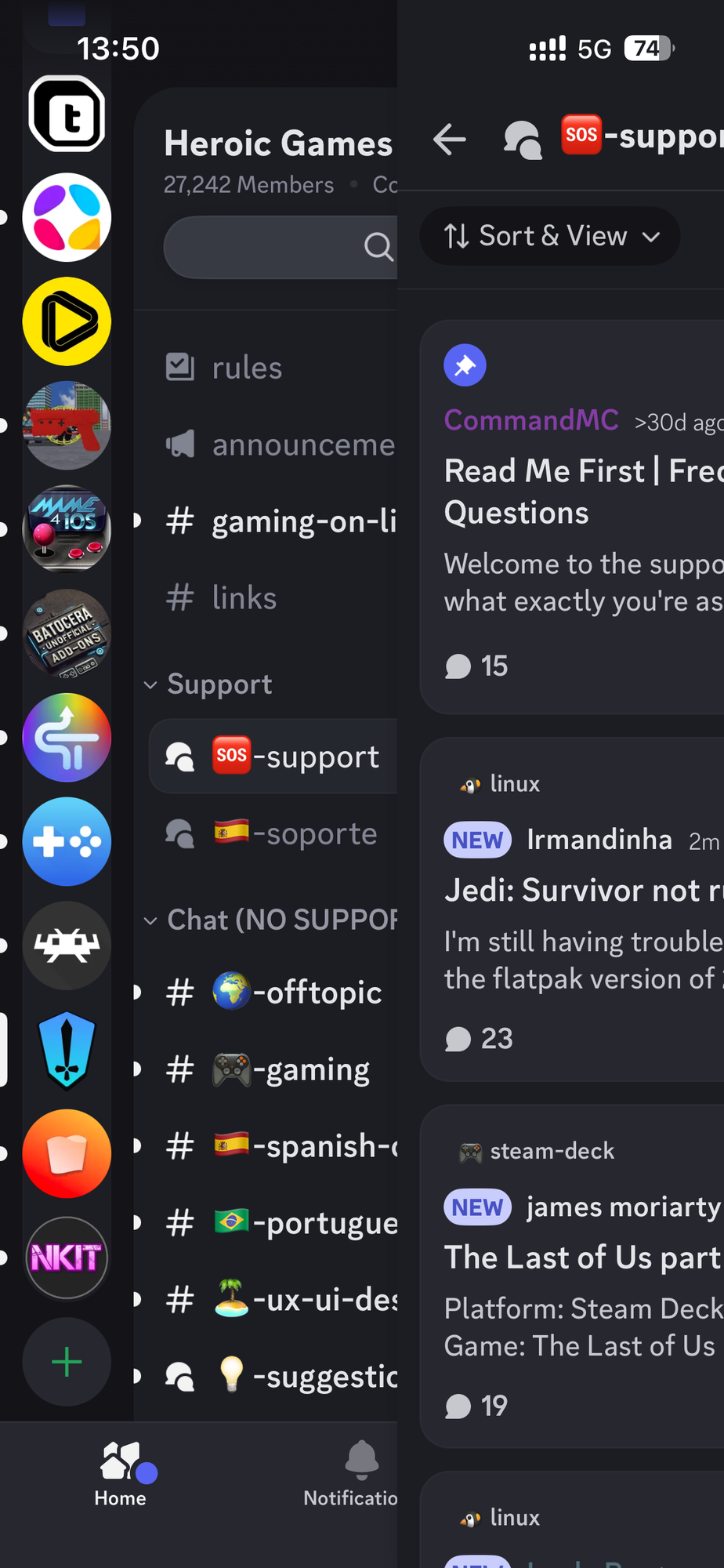
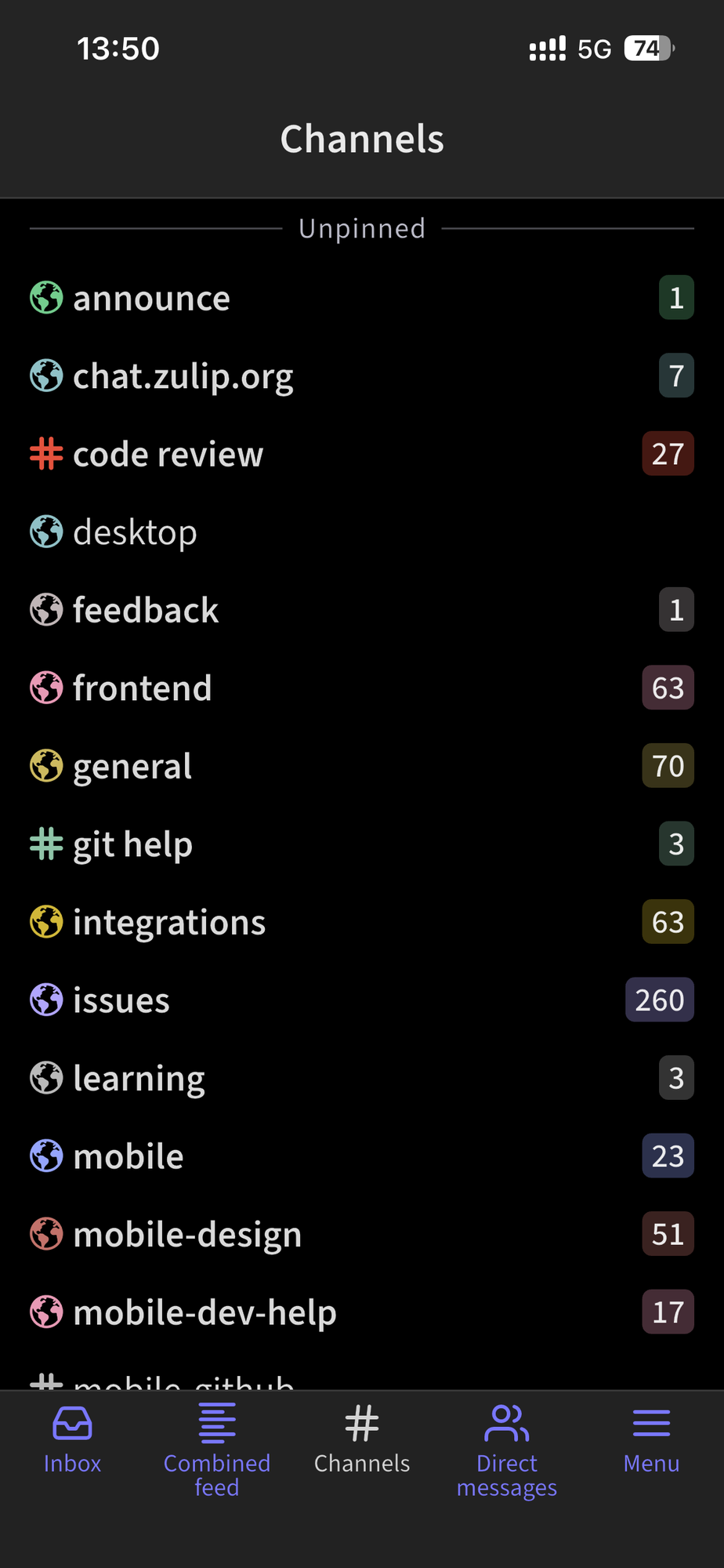
Basically, the interface, or the almost lack of it. You use Discord on a PC or mobile and the experience is pretty much the same. On Zulip this does not happens. It’s a totally different experience with several things lacking, like the folder organization, for instance.
Discord on mobile
Zulip on mobile
I’ve always found the Discord ui on desktop and mobile to be really bad, just very busy and unintuitive.
It’s a shame, zulip doesn’t have e2ee. not even DMs. but they seem to be working towards federation of some sort? there are no good/perfect solutions out there.
Five years ago, a open-source project I worked on moved to Zulip (from Slack) and it was a small hurdle. But after a month, I really like it!
So much that I’ve pushed a few other open source projects (who lived on Discord).
I was really surprised when I started a new job two years ago and THEY used a self-hosted Zulip. It’s everything Im used to on Slack.
Discord has team speak/video sharing, which I don’t think Zulip has. But then again, we use something else for video calls.
Zulip integrates with Jitsi, Zoom, and Bigbluebutton for voice and video chat. Looks like a sensible solution.
matrix is unreasonably hard to set-up, why doesnt the docker container or the compose include voice chat? i cant even sign up for stoat to try it out… is this the best we have against discord in the big 26 😭
I couldn’t figure out how to sign up for matrix server. Maybe there are peer tube videos.
Voice chat works out of the box with Matrix.
It uses WebRTC and tries to do P2P connections. Note that this leaks your IP to the other caller and vice versa, but it’s also quite fast as you can establish a direct connection.
If P2P fails it will try to fallback to your configured TURN server and use that one for relaying.
However not every instance has one (as TURN servers are usually not that modern and straight forward…) and if this is the case it will fallback to Matrix’s global TURN servers.
XMPP is also still a thing and IMO much easier to host (at least ejabberd is). Look into Movim, which looks quite nice as a discord replacement on top of XMPP.
Setting up Element Call on my instance was difficult on its own, I understand why Synapse doesn’t come with it out of the box, essentially you spin up Matrix’s JWT service for authenticating clients and it if approved forwards the connection to the Livekit ports which must be opened on your firewall (ie port forwarded), otherwise people will not be able to connect to calls.
Big PITA and in my experience, on my home network, can conflict with games with VOIP chats.
Edit: I don’t suggest running Element Call standalone, it has issues of its own, once you get Livekit and JWT running and follow This guide you should have your element call running, pro-tip for those running synapse behind docker and get confused on the whole
./well-knownpart of the documentation you can edit your./well-knownin your homeserver.yaml file like such:serve_server_wellknown: true extra_well_known_client_content: optional: client "org.matrix.msc4143.rtc_foci": [ { "type": "livekit", "livekit_service_url": "https://livekit-jwt.your.domain/" } ]https://matrix-construct.github.io/tuwunel/deploying/docker.html?highlight=voice#voice-communication
tuwunel seems to have some docker guides for how to set up voice & docker.
Have you Trier ESS?
Any Matrix clients support screensharing?
Element and Element Call, although no streaming audio support on the horizon anytime soon.
Matrix is an option but it’s slow and breaks all the time. I’m a big fan of XMPP myself but good luck convincing anyone else to make an account 😔
Dont knock matrix for being slow, it updates just as fast as anyone else’s network speed is and it is focused on encryption and security. Given [gestures broadly to everything these days] people moving away from major platforms should really take into account their digital footprint and privacy.
So do you have to have an account on a specific server and then get the client or get the client first? I can’t recall how to do it any longer.
Its pretty similar to Lemmy or anything else in the fediverse, someones full user name includes their home server.
Your admin just needs to have configured the service to except comminication from other servers and not just its internal users.
could you recommend a good xmpp setup? i heard good things about snikket, maybe something else too?
Matrix hoster here.
I would recommend Matrix as it has pretty much everything, including cross platform clients, threads, voice/video calls, screensharing, spaces (aka servers), federation and E2EE. Matrix also has bridges for Discord and pretty much every other service so this could ease transition…
But self hosting requires reading the docs and having some in depth knowledge and understanding as it can be quite complex.
I would recommend just creating a Matrix account on one of the common global servers and testing it.
If you want to self-host there are some pre-defined setups available (example) but I would still recommend to bring at least 5-10 hours.
Regarding operations: It’s really resilient and barely ever breaks and also doesn’t need a lot of resources. A 1-2vCPU server with under 1GB RAM server is enough for less than 10 people.
You se knowledgeable on this, so I hope you’ll allow me to ask this.
I don’t know anything about Discord, but I selfhost the Mattermost chat system for my family. They, too, are narrowing the free tier.
Can Matrix replace Mattermost for a family? Several separate “rooms” for various topics, plus 1-to-1 chats.
If it’s just chatting with your use case: definetly yes
E2EE group chats on matrix seems to be a huge problem still. I look forward to their MLS implementation. Hopefully that fixes a lot of these UX issues.
may i ask which homeserver and client you use? it seems like synapse and element is not the best choice especially for small number of people.
synapse and element/schildi-chat work quite well for me :)
On mobile the newer Element X clients usually lack some features (like calls) but you can use them quite well for chatting.
Check out https://stoat.chat/, it’s the closest self hostable group communications platform to Discord.
Honestly the name choice adds difficulty in getting friends to take it seriously. Why did they pick “stoat”
The name doesnt matter
IRC is a stupid name too, unless you know what the letters stand for
Msn messenger was stupid
Icq was stupid
Wtf even is “skype”?
It just has to be unique
And a Stout is kinda cute
No clue! It was revolt before. I think they had trademark issues with that name. What’s wrong with stoat?
I was wondering why I want getting any updates, checked thegithub a few months ago and found out they rebranded. Haven’t had a chance to try the latest version out yet
Nowadays everyone accepted the name “Discord” but I think it’s a pretty poor choice of branding too.
A communication app called Discord is pretty weird too.
A stoat is a pretty cool animal.
I think without prior knowledge of any voice chat Discord would probably rate worse in perception than Stoat.
Nowadays everyone accepted the name “Discord” but I think it’s a pretty poor choice of branding too.
A terrible name for an app meant to facilitate communication. Always baffled me. But the name is so widely recognized that nobody thinks twice about it.
I always thought Noosphere would make a cool name for a Discord replacement, especially if it incorporates a way to permanently catalog the knowledge accrued by the community, say as a built-in wiki. That might actually make it viable as a support platform.
you mean unlike the tools discord has replaced, such as “mumble”, “ventrilo”, “roger wilco” and “trillian”?
Xfire
Mumble is a verb like chat but what the fuck has a stoat got to do chatting?
now do the other ones
Do them yourself and you want to copy all those failed apps, lmao.
Mumble is great and I still use it. None of those are failed apps.
Not every app seeks to rake in teenagers’ parents’ money with shit like premium emojis.
So, where are all the posts saying, ‘self-hosted ventrilo?’
Unironically yes
soundn like a problem with your friends then. who doesn’t love a stoat?
I know, it’s picky lol. I’m still considering it as the replacement for my discord groups (also checking out Element/Matrix). The average users aren’t going to be up for swapping around a lot of platforms, so I am hoping to make one big push on the platform of choice. “Revolt” would have gotten less “wtf is that, how do you even spell it?” than “Stoat”
Discord never replaced mumble. The two are in different circles.
What do you meeaaan? Stoats are fucking adorable!
This whole “FOSS names are bad” sounds like a Mccarthyism sysop by this point. Like, really, who is pushing that crap?
seems like they had a decent name ‘revolt’ but got some cease and desist and didn’t resist and decided to switch.
Is there a significant benefit over matrix?
From what I can tell, the only benefit is that the platform is close to the Discord experience. So people migrating to Stoat would feel right at home.
But there’s no federation, no e2ee, apparently it’s difficult to get voice setup if you self host…
Matrix has it’s issues too. Goup chat e2ee is not good. No one uses it. But at least they’ve got federation.
https://continuwuity.org/ seems like a decent server to run if you want to run a matrix server.
has anyone tried their iOS client? from their description it seems like it’s less mature than the android version, kinda concerning as my friend group has some iphone users.
Just a fair warning in reply to this that the self-hosted version of Stoat doesn’t currently have voice chat. It’s an open issue that’s currently paused until they can finish their rework.
If you have the skill for it, it seems like you can patch work the existing voice chat back in, but it’s not part of their initial setup and there’s no instructions on how to do so properly
Link to their voice chat implementatoon.
Looks like you can enable it on self hosted version. Probably worth someone trying it out personally. Before giving up on stoat.
sadly, it’s a little more complex than just enabling it. The supported self host deployment uses docker, and the docker containers that are available don’t contain the interfaces for voice or video calling as they are not up to date.
If I understand it right, to enable it would mean you need to either pull the source yourself and run it off of docker, or make a custom docker image using a version of stoat web that contains the ability to do voice calls.
reading the draft of the linked issue, it looks like the author isn’t doing voice call for the reason that they don’t know the proper way to integrate it into the docker image.
So to answer it: yes it looks like you can use voice servers on the current self hosted model, but you can’t use pre-existing docker images, and it will require you to manually add the new web UI in and patch where needed.
Turns out they also don’t support federation or e2ee. If those are things you care about.
Is there a docker-free build you can either install and mod to re-enable voice, or use to mod the docker blobs in accordance ?
Well that seems like a fairly big deal.
Where is the documentation for self-hosting it?
Check their GitHub. Although it looks like GitHub is having issues right now.
TeamSpeek or Mumble.
Both have excellent voice chat.
Teamspeak still requires a license above a small user size, but has multiple clients that can accomodate different target audicences. The TS3 client still looks like it did back in the windows 7 days and the TS5 client is just copying discords homework (Not a clue what happend to 4 and I believe 6 is under development). Both use the same server backend and database structure so both work with one server and different user expirences.
Mumble is still the gold standard for handling large user bases (there is a reason big EvE Online alliances use mumble). It will take longer to set up, the configuration is handled by the server, not through authorized user accounts like TS.
I think you can hlst your own teamspeak server
I would take a look at TeamSpeak or Matrix.
Of the two Matrix is probably the closest to Discord.
@Vaggumon check out https://stoat.chat/
Haven’t found one that’s as good yet personally…
I am not knowledgeable enough yet, but doesn’t self-hosting Nextcloud have a voice feature? I’m looking into setting that all up myself
I still use IRC. There are now modern web clients like The Lounge or Convos that can display/share images in the channels, keep history and push notifications. Apparently Convos can do video chat but I never tried it. Unfortunately I’m not aware of screen sharing features for any of these.
So on a very simple setup, you need an IRC server, then install and connect one of those clients to your server, and use them through a web browser, either on a computer or on a phone.
It’s obviously not entirely Discord-like, but it is a simple way to chat and share images.
deleted by creator