cross-posted from: https://aussie.zone/post/36389875
Why jump from 10.11.11 directly to 12.0? -> Blog Post
You can find more details about and discuss this release on the official forums.
As always, please ensure you stop your Jellyfin server and take a full backup of your metadata/configs before upgrading!
Direct upgrades from 10.10.7 and 10.11.x to 12.0 are supported; intermediate upgrades are not required. Users running releases older than 10.10.7 are strongly encouraged to upgrade to 10.10.7 before migrating to 12.0.
Installed repository plugins (anything not built-in) should also be removed before migrating. Plugins will likely need time to adapt to the new database changes, so re-adding them afterward is the safest approach for testing.
Official plugins compatible with Jellyfin are available through the stable plugin repository. If you have changed to the unstable plugin repository please change it back.
Go to Dashboard -> Plugins -> Manage Repositories
Update the Plugin Repository URL to: https://repo.jellyfin.org/files/plugin/manifest.json
After migrating please perform the following steps.
Perform a full library scan to restore alternative versions
Run the "Optimize database" scheduled task
___
You must log in or # to comment.
Let me guess, another price increase.
I can confidently say that the Jellyfin team intend to raise the price 10x the previous price.
Those bastards! I knew it!
Plexing their muscles, as usual.
Thank you for the reminder to donate to them <3
Please donate to your favorite client maintainer (if 3rd party) or another project.
The core team stated that theybalready have enough funds.
(Look at the funds that are still unusued): https://opencollective.com/jellyfinOh shit. Ok. Thank you for bringing that up. I only really use their official apps, but I’ll find another one to donate to.
No worries :)
You can still send them a token of appreciation. But maybe not all of it.
Jellyfin is free. What price? :D
$0 x 4 😡😡😡
That’s the joke.
The price increased 4 times over the previous price.
Now THAT is a changelog.
Really excited about the query performance improvements, and the improvements to subtitle handling.
I’m wondering if this has anything to do with the team lead changing?
A big push in features that had been waiting on the back burner?
Can’t speak to that, I’m not involved. All I know is that,
- Jellyfin server gets significant upgrades in subtitle capabilities and performance,
- Jellyfin AdroidTV just released an RC that finally includes direct play for ASS/SSA subtitles,
- and on Monday, I FINALLY resolved a hardware issue (faulty cable) that made my Jellyfin almost unusable whenever ASS/SSA needed to be played (and only in that situation. Fun!)
So yeah, I don’t know or really care about leadership change, I just know it’s gonna run like a rocket now 😄
I’m so curious what the cable was and how it affected only ass/ssa subtitles?
Haha. Might have slightly exaggerated. But only slightly.
The Proxmox host in question has a 1Gbit connection to the NAS. (Unfortunately. The other hosts don’t have a GPU, but SPF+… Oh well, can’t have everything.)
At some point in the last couple of months, it must have been damaged, and negotiated down to only 100Mbit. This must roughly have coincided with the Jellyfin 10.11 update, since I remember thinking that it must be the cause, due to close proximity of update and first issues.
Anyways. For basically everything in my library, 100Mbit is fine. Streaming an episode NAS->Jellyfin and Jellyfin->TV at the same time basically never saturates the link.
BUT, from what I’ve gathered by digging through Jellyfin issues and PRs, there’s a separate issue where Jellyfin will pull the episode, and if you need subtitles extracted from the episode file server-side (to transcode them in, if the clients can’t play them), it will at the same time pull the episode AGAIN, and together with the Jellyfin->TV direction, that’s frequently enough that it saturates the link.
Symptoms is (was) either a 20-30s wait before the episode would start playing, or complete freeze.
However, I believe this particular issues has been solved for a while. I’m not sure, because I instead opted for the Subtitles Extractor Plugin, which runs nightly and pre-fetches all the subtitles and stores them on the Jellyfin VM itself.
Where it was still noticeable though was if one of [Library Scan/Trick-play Extraction/Subtitle Extraction/Media Segment Scan] ran while playing an episode, the server would completely lock up.
Long story short: cable swapped, 1Gbit, all issues gone.
whoops!! that’s an interesting overlap of issues! glad a new cable did the trick (and that jellyfin fixed that).
I’m so happy that I got the 253 years subscription.
Ha! Shows what you know. I got a 256 year subscription at only 10x the price!
Wao, I got ripped off. I’m a fucking moron.
best money I’ve ever spent
,and.scrub frame-by-frame during playback
That is exactly how MPV does it. But from what I remember, VLC devs claim it’s impossible, so VLC only allows you to scrub forward frame-by-frame, not backward. You can skip backwards in three-second increments or whatever, just not frame-by-frame at all. It’s the main thing that keeps me using MPV as my default video player, because I frequently skip around videos trying to get a screenshot of the perfect frame to use to make a meme or something. Being able to scrub frame-by-frame in both directions is a big deal.
There’s a VLC addon that is able to do it. https://addons.videolan.org/p/1154013/
So, every time I want to go back one frame, I have to open that plugin from the menu and then respond to that dialog window? That is certainly more cumbersome than the way MPV/Jellyfin do it, where scrubbing is just a keyboard shortcut. Even if I assigned a keyboard shortcut to activated that plugin (I assume that’s possible), I still have to respond to that dialog box?

When I scrub through a video to get the perfect frame to screenshot, the experience is usually something like:
- Pause video, no that’s not the right frame
- Scrub back five frames, not right
- Scrub forward one frame, looks closer
- Scrub forward one frame, looks closer
- Scrub forward one frame, that’s almost what I want
- Scrub forward one frame, that’s worse, I guess I went too far
- Scrub back one frame, settle on that one
Using MPV, that’s pretty simple because each step there is just a keystroke that takes zero effort and zero time. But if each of those steps also required me to respond to a dialog box, that would just make the process tedious.
Yep. I didn’t say it was good, just that there is an option.
Any changes to the massive memory footprint of JF? I’m basically stuck on Plex because JF eats multiple gigabytes of my very limited RAM.
You could just upgrade, I assume RAM is cheap, haven’t looked in a while, just let me look up memory prices real quick…
They died from the shock. 😔
JF uses south of 480 mb right now on my rpi4 2gb when idling. It plays fine too, though struggles with transcoding.
deleted by creator
If it’s direct play, this makes sense, but it sounds like maybe they are transcoding video
@Statick
That’s what I thought…
Does it actually? My VM has a lot of RAM, and Proxmox reports usage always around 90%, but that’s no matter how much RAM it ACTUALLY has, because almost all of that is cache and not strictly necessary.
free -mshows Jellyfin using maybe 2 Gigs.I think you’re accidentally transcoding something
Yeah that mostly ironed out by 11.11.
But its also a different philosophy where JF caches more in RAM than it did before, but that’s available for use by other proceases if needed.
deleted by creator
love the new layout just sad that home screen sections isn’t working yet :3
also if you did
"^jellyfin"in yourapt install, they specifically do a newjellyfin-ffmpeg8which trips it up so you have to manually specify each package (that was my only issue… which isn’t even an issue)Apparently, it silently auto-upgraded. Aight. I was wondering why everything was smoother.
Are there different hardware requirements? I’m running on a raspberry pi 4, and as soon as it tries to load my movies the entire server crashes. This happened with the first release candidate, but seems to still be happening.
Did you report the issue?
Was able to fix it. The initial library scan caused the server to crash (ran out of resources) so every database load would make the server crash since the initial scan never ran. The solution was to turn off the other containers I had running, then run the scan, then turn everything on.
Not yet. I’ll have to mess with it more when I get home tonight.
I wish they’d fix the screen off while audio plays on android issue.
i wish they’d fix the black screen and not returning to home after episode ends issue/feature, and also not being able to scroll after manually returning home. can’t use old enough versions anymore where it still worked right (2023 versions and older i think)
Thats a client config issue not a server issue.
Go to settings > client settings, enable the background audio with the checkbox:
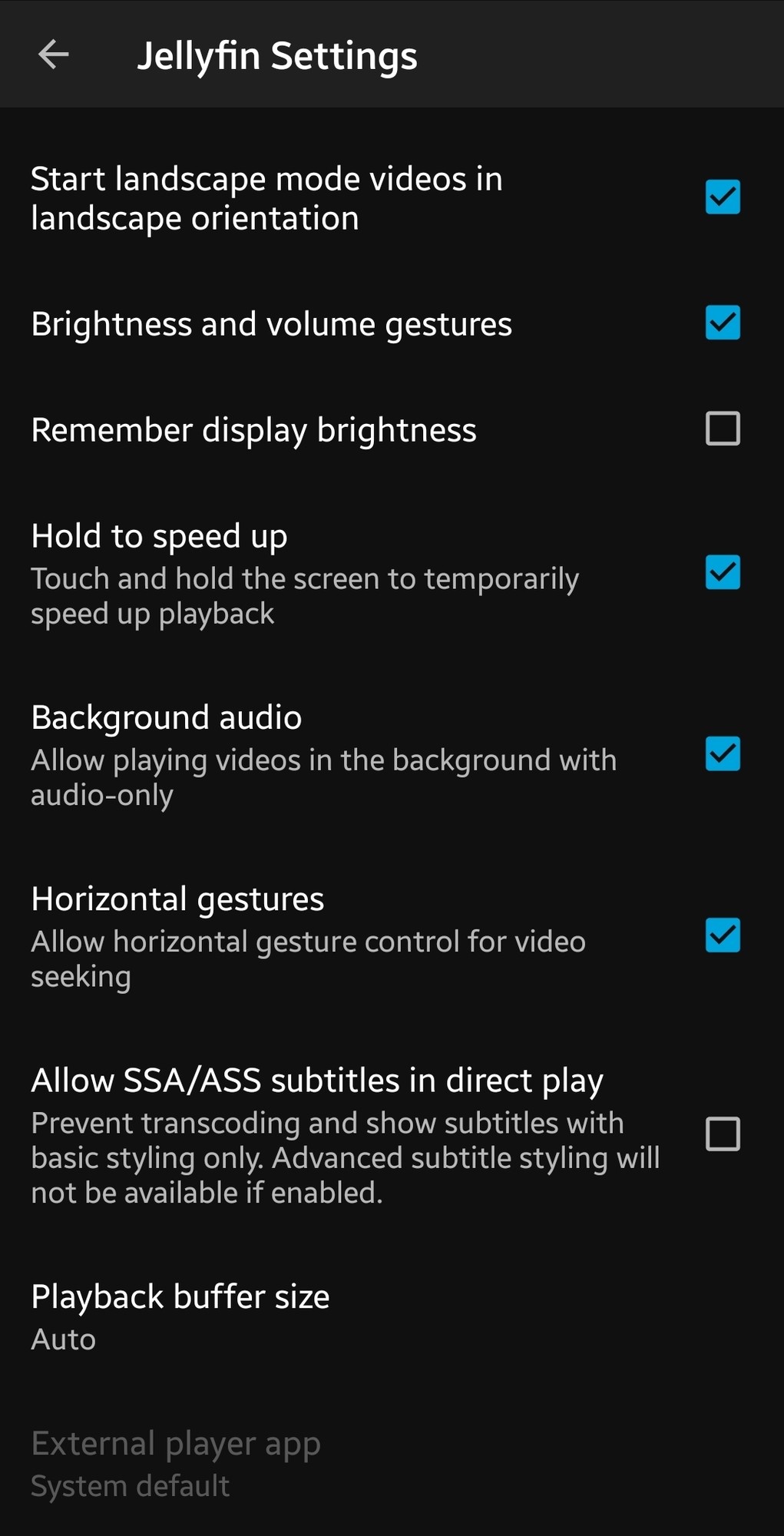
Go to settings > client settings, enable the background audio with the checkbox:
That definitely does not fix the issue. Not sure if it is just certain devices or Android versions or whatever that have that issue, but having that checked makes no difference for me in recent months. Even with that setting enabled, if I start playing a video then switch to another app, the audio keeps playing for three seconds or so and then just cuts out. The video keeps playing in the background, but no audio.
You can try streamyfin which is enabled by default, but what’s likely happening is that your phone is disabling it as a background app. I’d check your phone settings for power management/pausing background apps. I can tell you that audio only playback with the screen off and as a background app works just fine with JF (official client), I was just using it that way earlier today.
Maybe you can try to enable the “run in the background” battery saving option?
It’s set to “Unrestricted”:
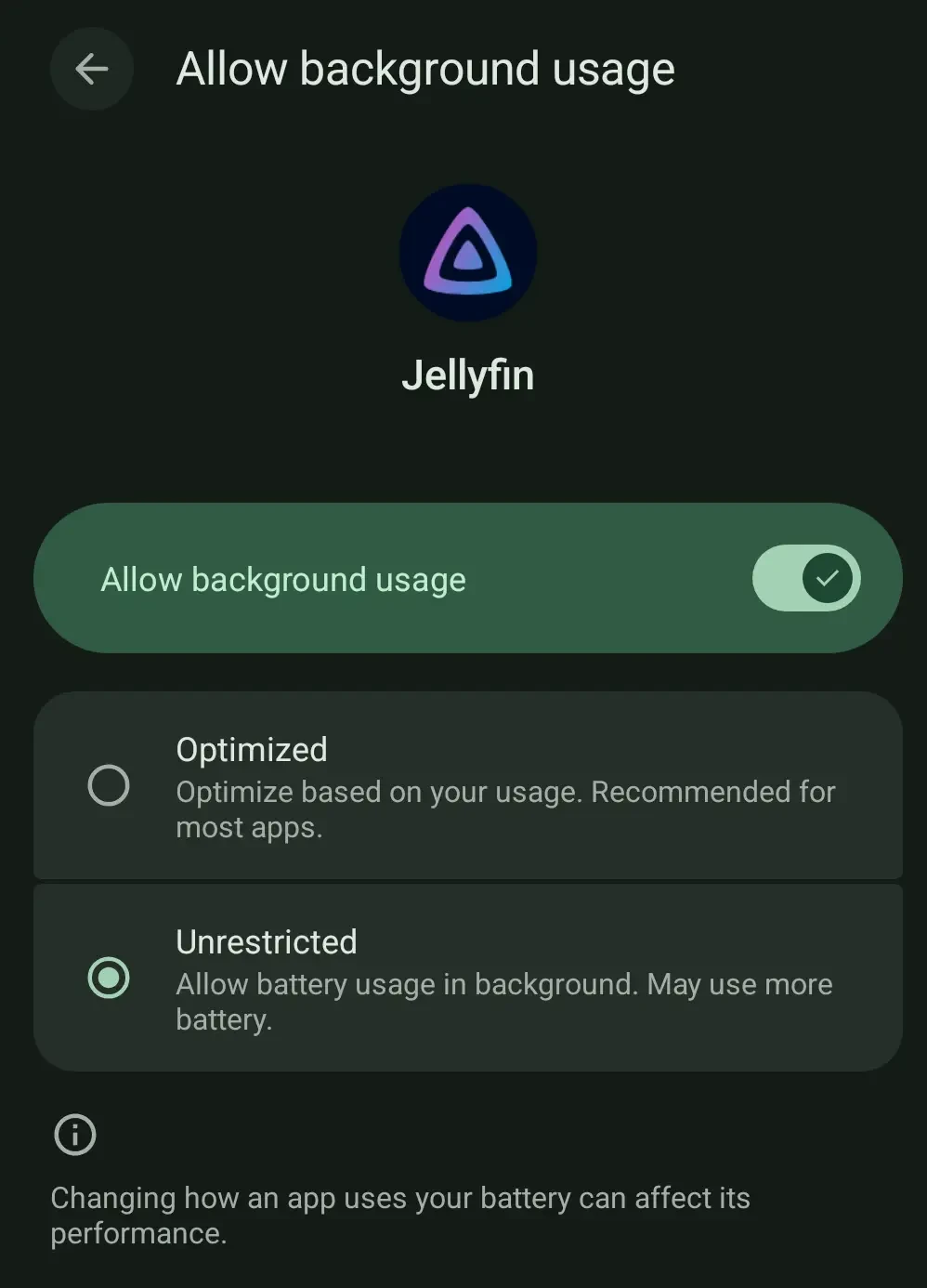
Besides, like I say, the video does keep playing in the background, it is just the audio that cuts out after a few seconds.
Did you disable the battery saver setting? On some android flavours it can ignore the battery/background usage
How about battery saving settings? Or data saver? (I constantly use battery saver, and it’s pretty aggressive with restricting processes)
Try Findroid. I found it to be a better overall experience.
Or if just looking for a solution too music, Finamp is pretty good as well
I’ve been using Jellyfin for years, on different hosts. Music has never worked on any of my devices - there’s a bug where you try to play a track and it ignores you and plays the first track off the album instead. You can literally never play anything after that. To be fair, I haven’t tested this in six months, but it was a consistent bug for years before that and I’ve tried every client under the sun. Nowadays I use Jellyfin for video and Navidrome for audio instead and it’s all good.
The reason is the feedback we got after 10.11.0, which we first raised in January and confirmed in May. A release like 10.11.0 was, by any reasonable measure, a major release - it rewrote the library database - but the version number presented it as a minor update, and people upgraded with expectations to match. The leading 10. never changed and never told anyone anything, so all it did was push the number that actually mattered into the middle position and make “major” releases look minor. Dropping it means the first number moves when the release is big.
lol. All the Jellykins in here lost their minds when this was pointed out.
I dont get why they didn’t just call that update 11.0? Or use that for this update?
I guess if you’re changing the semantics of your version numbers its also a good idea to introduce a deliberate discontinuity to mark the change?
This one goes 1 more than 11
I was confused too, but I guess their logic is that 10.11.x is 11.x.x. They might have been more explicit about that.
My guess is that people would call the 10.11.x update something like .11.x instead of the full version because “they don’t change the first number anyway” and it would cause confusion to call the next update version 11.x.x so they just jumped to 12
How do you get this to work remotely easily for old people on smart tvs?
Domain + reverse proxy. The security issues some people here claim are significantly overblown.
Or, unpopular opinion, use Cloudflare tunnels. Almost too easy to setup and free of charge. Much easier than reserve proxy imho. Of course it has drawbacks, e.g. many are critical toward the company
Cloudflare tunnels need logins, depend on cloudflare, and allow cloudflare to sniff all your traffic.
They’re easy, but we should stop recommending them. They’re a terrible solution, both for the internet as a whole and for your personal privacy.

Tailscale is a pretty good option if said old people have an Android or Apple TV, not sure about availability of Tailscale on any other OSs. Run it on your server and the TV client, grab the Tailscale IP from the dashboard and enter [Tailscale IP]:[Jellyfin port] when the Jellyfin app asks for the server address. You could homebrew a VPN too. Only other option would be a domain name and a reverse proxy.
Only other option would be a domain name and a reverse proxy.
This is how I set it up for my family and friends. Works like a charm, especially if you have a dynamic IP. Everyone just signs in through whichever app they want to use.
Same, I had enough people I wanted to have access to it that I didn’t feel like explaining Tailscale to all of them. Also, you can’t easily run Tailscale alongside a regular VPN like Proton or Mullvad. Of course, you have to pay for the domain name and setting up a reverse proxy and appropriate DNS forwarding rules are not trivial tasks.
this is the way imo. I also took the time to disable internal authentication and hook up authentik via the ldap auth plugin. so for my users, I can text them a link, they set up their credentials and verify their email, then they can sign in to jellyfin with the same creds and it automatically creates a profile and everything.
You go and meet them.
Best case if you can set up a s2s vpn.
Updated on Ubuntu, installed package is 12.0 for Server+Web, but clients still show server version 10.11.11

Just clear your browser cache ;)
Ctrl+F5
Cleared your cache?
What kind of client? In browsers usually CTRL + F5 solves those kinds of problems for me. In other cases (apps?) force quitting and restarting the client might help.
From the changelog:
Packaging
- Debian Bullseye and Ubuntu Focal packages are no longer built
Are you maybe running Focal?
I’m on Ubuntu and it reports server and web to be v12. Also the ui is different. Same happening on web interface & Android app.
Do you try turning it off and back on again?
Haha. I did.
Is there a Samsung TV app yet? I’ve heard it’s out for some…
I used this repo to install jellyfin app on my Samsung TV https://github.com/Apps2Samsung/Apps2Samsung
I had some issues with config changes, but it’s working now :)
I really just want the fireTV app of Jellyfin to not be so dogshit.
I got tons of cool plug-ins running on my server that work fine via desktop/mobile… but access the server using the FireTv app and you’d never know. No mediabar enhanced, no seasonal, no achievements or local ratings…
That’s developed by a different team
Idk if Wholphin will fully fit your needs, but that’s what I use on my FireTV and we love it. It looks sleek as hell and has sone plugins like Serr requests. Weirdly though, it takes longer to load an ep on there compared to my laptop or phone.
You should see the Tizen version…
Though neither are made by the Jellyfin tram, and they’re both dealing with the constraints of the underlying dogshit hardware/software