Hey everyone,
I’m new here! I wanted to share a music search and discovery tool for Lidarr. It plugs into Spotify, TIDAL, Deezer, Last.fm, MusicBrainz, Plex/Tautulli, Jellyfin, and even some AI recommendations.
GitHub: https://github.com/aquantumofdonuts/mixarr/releases/tag/latest
Website: https://aquantumofdonuts.github.io/mixarr/
What it does:
- Connects to Lidarr and analyzes your existing artists
- Hooks into Spotify, TIDAL, Deezer, Last.fm, MusicBrainz, Plex/Tautulli, and AI services
- Finds related/similar artists, new releases, charts, labels, playlists, etc.
- Gives you a review queue to approve or dismiss discovered artists
- Automatically adds approved artists to Lidarr with the profile you choose
- Has a universal search and discovery interface across all services
- Runs as a web app (Next.js frontend + Express backend) and plays nice with Docker
Why I built it:
I wanted one tool that I could point at my Lidarr library and get a steady stream of relevant artist recommendations.
Basically, make music discovery feel as automated and “infrastructure-y” as the rest of the *arr ecosystem.
Current status:
- Working with Lidarr + Spotify/TIDAL/Deezer/Last.fm/MusicBrainz + Plex/Tautulli
- Has subscriptions for different discovery sources (charts, playlists, related & followed artists, etc.)
- Docker-compose setup available, plus local dev if you prefer
- Early but usable; I’m actively using it myself and iterating
Just spun it a up earlier today, looks great! I’m wondering if maybe I’m misunderstanding how listenbrainz subs work. The explore subscription doesn’t pull in my users “weekly exploration” playlist, it’s totally unrelated songs it’s pulling. Although it does appear to pull in accurate listenbrainz artist recommendations
Sorry, which subscription specifically were you using? I’ll try to reproduce the behavior you’re seeing. Might be an easy fix.
Listenbrainz Explore
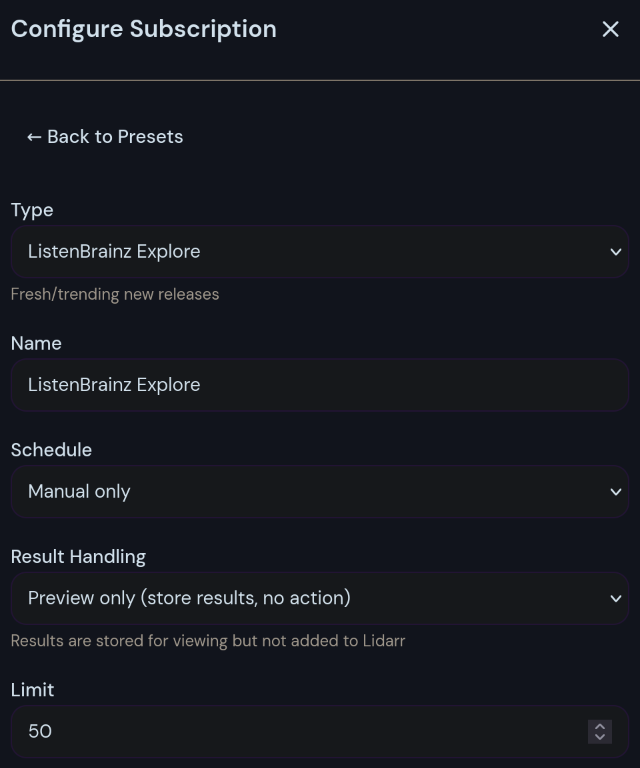
I just noticed there is an explore tab on listenbrainz, is that what this is supposed to pull from? I was thinking it was supposed to pull from the weekly exploration playlist listenbrainz creates.Ok, got it. Yes, this was a funky UI bug. There is now a ListenBrainz preset for Weekly Exploration, which pulls from the user’s playlist, and the “type” dropdown is disabled once you select a preset.
Please give it a try, let me know if that fixes the issue you were having. I updated the repo, you can pull and rebuild containers to get the changes.
Thanks!
working as expected now. Thanks! would you prefer feature requests on the github repo or here?
Great to hear! Feel free to post feature requests in either location, but github will tend to be preferred. Thank you!
Sorry about that. Link is fixed.
Was super interested right up until the AI recommendations bit.
You might not like it, but AI can totally give you a recommendation of similar bands.
I can tell there are at least 5 people who didn’t like your suggestion. LMAO. But indeed, AI can do this and do it well. I put a few songs in and tell it to recommend similar Indie musicians. Works like a charm.
I’m OK with it as long as it’s not an LLM recommendation
Nope, LLM is not a requirement at all and is disabled by default.
I completely understand. Just one minor feature though, and it’s entirely optional. The real meat is in the “subscriptions”, which rely on more steadfast services like Last.fm and Spotify.
How does this compare to lidify
The Discover feature is pretty much identical to what Lidify does. The distinguishing feature is the Subscriptions though. Like automated Lidify.
Awesome!! I had been wanting to make something like this, but never got around to it. Excited to try it out tomorrow
GitHub link is funky, need to remove the ()
Thank you. Link is fixed.
This sounds great. I will have to check it out when I’m back home. I have been missing a music discovery tool as I am trying to avoid using any of the corporate overlord algorithm machines.
Awesome! I hope you like it. I’ve successfully converted my household from Spotify to Plexamp using this. Setup a few subscriptions, let the new artists and recommendations roll in, and you have a constant stream of new music.
Looks cool. Any chance you’ll add Qobuz to the integration list in the future?
Do you know if it will work with SQLite? I’d like to try it but I hate spinning up more postgres instances
Hi, it might but I haven’t explored that. I’ll look into it. Would you want to roll your own SQLite, or just have that containerized instead of postgres?
SQLite doesnt require you to have any service running, the DB is just stored in a file which the program accesses through an SQLite library. I think its the best option for selfhosted software, as its very lightweight and more than performant enough for 99% of these use cases.
Performance isn’t the only advantage to a full postgres deployment. I have a central database for all of my self hosted apps which makes it really easy to back it all up.
I’ve had a lot of problems in the past from software crashes that left sqlite files in a corrupt state, backups where the sqlite file wasn’t properly closed leaving it in a weird unlockable state, transactions not completing when swap is used, etc. Besides that sqlite really doesn’t play nice with NFS, which is the basis for quite a few cloud storage providers.
“Best option” really depends on what self hosting looks like in your specific setup.
Yeah, I wasn’t trying to say SQLite is universally better. I shouldn’t have said best option, I really meant best default. I don’t think the majority of users are running a central db, most will just spin-up docker compose files for each service and end up with multiple SQL versions running.
I’ve had a lot of problems in the past from software crashes that left sqlite files in a corrupt state
I have had this issue, but it was always easily recoverable. I haven’t had the same issues with backups, although a lot of the software I use that’s running SQLite has a builtin backup feature, then I just backup that directory to a cloud service.
Besides that SQLite really doesn’t play nice with NFS, which is the basis for quite a few cloud storage providers. Also a good point, I just don’t think the majority of users are using NFS for their DBs.
When an app is using an ORM already, I think they might as well make sure it supports both SQLite and a hosted DB like Postgres
How hard do you suppose it would be to add integration with Qobuz?
I could look into it. Open an issue on Github if you like, and I’ll see what I can do. Thanks!
Connects to Lidarr
So, I don’t run the ‘arr stack’, and am not interested in downloading, but I would like recommendations on new music. I am running Navidrome which scrobbles to Listenbrainz. How would Mixarr fit into this scenario?
I pushed an update that adds a “review only” mode, with Lidarr no longer being a required connection.
https://github.com/aquantumofdonuts/mixarr/releases/tag/v1.1.1
Add any Subscription and set the result handling to “add to review queue”. Then, just look in the Review Queue tab for your recommendations.

Oh snap! Man, you didn’t have to do all that just for one dipshit who didn’t understand what Mixarr was. I should have done a bit more reading. I feel embarrassed. I will spin this up in an hour or two when I get my chores done. Thank you so much!
Haha no worries! It’s a useful feature. No reason to lock the subscription engine behind a Lidarr connection.
But I think I will rest for a while now lol.
Why would you need this for your scenario? If you’re not downloading you can simply check the listenbrainz recommendations in the playlists that it creates for you
Because I’m a dumbass who didn’t really understand what was going on. Kindly disregard the doddering old man.
Oh lol I see, it happens
Is it possible to set this up with navidrome instead of lidarr?
Navidrome can scrobble to Listenbrainz which this supports.
Does it work with SoundCloud? I wanted to self host my library
Not currently, sorry. But I will look into adding that integration in the future
I am trying to put this behind Haproxy but not having much luck, I keep getting “client sent an HTTP request to an HTTPS server”.
Anyone have a clue how to resolve this?
I understand this image has its own caddy reverse proxy, not sure how to bypass that at the moment.
Hi, I think you can resolve this by forwarding your reverse proxy to http://mixarr-ip:3010/. That bypasses Caddy altogether. Give that a try, and let me know how it goes.
I am running in docker, I got 443 pointed at 3443.
I saw the 3010 setting in the docs, i just can’t figure out if 3010 is pointed at 80?
3010 is the web port, on the web container itself (direct connection the the web ui). 3443->443 and 3080->80 are the Caddy ports, which also point to the web ui (just proxied through Caddy). Hopefully that’s not too confusing.
Understood, though it’s still kicking my butt TBH.
Exposing port 3010:3010 seems to get me a connection refused. But I can still connect to port 3443:443. Both ports are set to TCP.
Guess I’m just exhausted, will play around with it more tomorrow. Thanks for your help.
Sure thing. Can you share your docker-compose.yml or docker cli string? Maybe I can help.
First, thank you for making this. Seems very useful… That being said I’m having the same issue, even after mapping port 80, it redirects to https/443 no matter what I do.
services:
  mixarr:
      container_name: mixarr
      image: ghcr.io/aquantumofdonuts/mixarr:v1.1.0
      ports:
        - 3010:80 # Edit: change 80 to 3000 in order to bypass caddy in the container
        - 3443:443
      volumes:
        - ~/mixarr-data:/data
      environment:
        - SESSION_SECRET=$(openssl rand -hex 32)
        - FRONTEND_URL=https://my-domain:3443/
        - BASE_URL=http://my-domain:3010/
      restart: unless-stopped
Edit: Just realized you have it using caddy, always, and it is set to redirect to 443. You should give people the option to run without caddy in the container. I have my own instance of caddy running, I don’t need it built in.
That being said, changing it from pointing to port 80 and instead to port 3000 allows me to access it over http but ends up having authenticaton issues when trying to change settings.
Edit 2: Oh there is a much more robust docker-compose file. I was just going based on the readme. Will give it a try a bit later.
Thank you, your comment here helped me sort my issue out.
For anyone if you want to access this without the built-in proxy/caddy server set your ports in your docker compose like so.
- 3010:3000
- 3443:443 (this is the caddy port inside the container)
Been playing around with it over the last few days and I love it. I don’t use Spotify, but it does a great job at looking at my Plex library and recommending similar artists.
Great job, and thanks!!
Thank you so much! Glad you are enjoying it.