

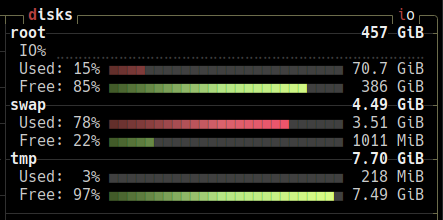
i have only one internal ssd and no external drives are connected
tmpfs? If so this is in RAM. You can check with
mount -lit lists multiple tmpfs:
tmpfs on /run type tmpfs (rw,nosuid,nodev,noexec,relatime,size=1616504k,mode=755,inode64)
tmpfs on /dev/shm type tmpfs (rw,nosuid,nodev,inode64)
tmpfs on /run/lock type tmpfs (rw,nosuid,nodev,noexec,relatime,size=5120k,inode64)
tmpfs on /run/credentials/systemd-journald.service type tmpfs (ro,nosuid,nodev,noexec,relatime,nosymfollow,size=1024k,nr_inodes=1024,mode=700,inode64,noswap)
tmpfs on /run/credentials/systemd-resolved.service type tmpfs (ro,nosuid,nodev,noexec,relatime,nosymfollow,size=1024k,nr_inodes=1024,mode=700,inode64,noswap)
**tmpfs on /tmp type tmpfs (rw,noatime,inode64)** (i am guessing it's this one)
tmpfs on /run/user/1000 type tmpfs (rw,nosuid,nodev,relatime,size=1616500k,nr_inodes=404125,mode=700,uid=1000,gid=1000,inode64)
tmpfs on /run/snapd/ns type tmpfs (rw,nosuid,nodev,noexec,relatime,size=1616504k,mode=755,inode64)
i hope these are all as konsole doesn’t seem to have a search function in kubuntu, why?
You are correct this is the one mounted on
/tmp.Everything under
/runand/devis normal to be on tmpfs and should not be changed.In Linux, a lot of internal systems and devices are considered as files even if they are not really a file in the usual sense of it. For example what is in
/devis usually not really taking up RAM space but more of a representation of the devices (internal and external) that are attached to your system. You can programatically read and write to these “files” to communicate with the devices.