- cross-posted to:
- [email protected]
- cross-posted to:
- [email protected]
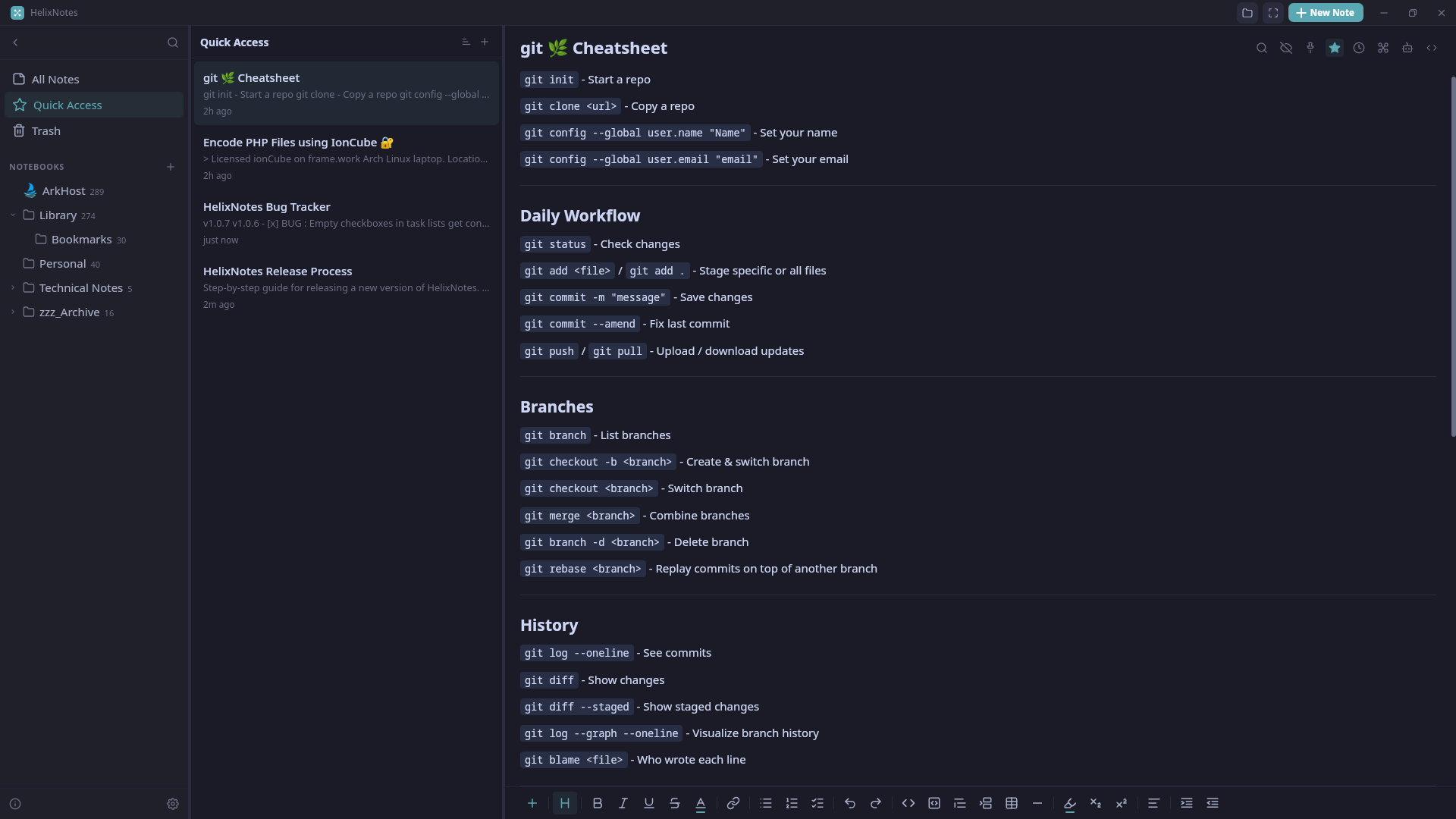
I built a note-taking app because the one I wanted didn’t exist. Clean UI, local .md files, no cloud, no account.
Built with Rust + Tauri 2.0 + SvelteKit. Full-text search powered by Tantivy. Graph view, AI writing tools (bring your own key), Obsidian import, version history.
Available for Linux (AppImage, APT, AUR), Windows, and macOS. Source: https://codeberg.org/ArkHost/HelixNotes
You must log in or # to comment.
Plugin support?
Not at this stage. It’s something I’m considering but the priority is getting the core experience right first.
Hi ArkHost,
Obsidian user here. I tried HelixNotes for a couple of minutes and here’s my feedback:
- I like that you support compatibility/converting Obsidian vaults. I wish you would at least support Obsidian’s wiki links directly. I won’t convert all my notes just to try if I like your editor.
- View mode doesn’t seem to really do anything. Ah wait, seems like I can only click links in view mode (no visual distinction between normal editor and view-mode apart from the tiny
view modebadge). But that opens the linked note in my default.mdviewer, not the HelixEditor itself. IMO view-mode should be visually distinct and also work together with source-mode (so I can edit in source mode and then click view-mode to see the rendered note). - I like the simple look, although the UI is not as polished compared to Obsidian.
- I need Math support (
$ ... $). - I hate that you update notes front-matter even if I just view and not edit them. Only change notes I am editing myself. I just had a look and now you changed the format of my notes. Re front-matter it would also be good if that behavior is documented somewhere.
- I closed my vault (clicked on the folder icon in the top right) and wanted to reopen it, but got an error:
Failed to acquire LockFile: LockBusy. - The graph view opened but stayed empty.
Feel free to use my feedback however you want, or don’t. Personally, there’s more than one deal-breaker for me to switch from Obsidian to HelixNotes, without even considering the nice-to-have features added by all the plug-ins. I recommend you to listen to people who are more likely to use your editor than me, or are already using it. I hope my comment doesn’t come over too negatively. I tried to give honest feedback why personally I won’t use HelixNotes anytime soon. I wish you all the best.
You even overwrite previously existing front-matters. From just looking at a note. This is a fucking no-go! Luckily I was able to revert all the unwanted changes HelixNotes applied to my vault.
This is a warning for everyone who wants to try HelixNotes with an existing vault.
The import dialog warns you to make a backup before running as it modifies files in place. That said, the frontmatter overwrite on just viewing a note is a valid bug. I’ll fix that, notes should only be modified when you actually edit them.
Fixed in v1.1.0
Appreciate the honest feedback, doesn’t come over negatively at all, this is exactly what helps improve the app.
- Obsidian wiki links not converting properly during import: that’s a bug, will be fixed in the next release.
- View mode, math support, frontmatter behavior, and the other UX points: all noted and will be considered. So far I’ve focused on features I use personally, but if something makes sense, improves the app, and keeps it focused without bloat, I just implement it.
- The LockFile bug and empty graph view: I haven’t seen this behavior yet but I’ll look into it.
HelixNotes isn’t trying to be a replacement for Obsidian. It was a replacement for Obsidian for me, but different people have different needs. Thanks for taking the time.
Does this have anything to do with the Helix text editor?
No, completely separate project. Just a coincidence in naming.
AI writing tools — improve, summarize, translate, and more (Anthropic / OpenAI)
why though
Fair question. Use case: you take rough notes during a meeting, no formatting, just raw thoughts. AI can clean them up, summarize, or restructure after the fact. It’s completely optional though. Disabled by default, doesn’t even show in the context menus unless you explicitly configure it in settings with your own API key. If you don’t want it, it’s like it doesn’t exist.
So, a feature for those who want it, but turned off out of the box for those who absolutely do not want it? Did I understand correctly?
Exactly. Off by default, invisible unless you enable it.
As ai features should be. You’re the dev?
Correct. Yes I am.
Cool. I appreciate this design decision. If only more went that route (looking at you, Microslop)
I see on the page it says you can bring an anthropic or openai key. Can I also point it at my own locally hosted model?
Not at this moment. Which local model would you like to see as an additional option?
Ollama, lmstudio, llama.Cpp
Ollama is now also possible.
I don’t know what is typical, but when I use AI locally I’ve been running llama-cpp with models grabbed from HF (ex. QwenCoder). Then in my VS code plugin (RooCode) I use the “OpenAI compatible” option to point it at my local server.
Not sure how hard that is to get working, but my hope is that “OpenAI Compatible” helps.
Removed by mod
The name comes from the double helix. Structured but flexible, like how notes should be. Trilium is a solid project, but it stores notes in an SQLite database and runs on Electron. HelixNotes keeps everything as plain .md files and uses Tauri, so much lighter on resources.
Removed by mod
Tauri is an alternative to Electron. Both are frameworks for building desktop apps with web technologies, but Electron bundles a full Chromium browser (which is why Electron apps use so much RAM). Tauri uses your OS’s native webview instead, much smaller, much lighter. Both are open source. The difference is resource usage.
Removed by mod
Electron came first and has a massive ecosystem. Most apps were built before Tauri was mature enough. Switching frameworks is expensive, so existing apps stay on Electron. New projects are increasingly picking Tauri though.
I need my notes with me. I use SiYuan and I’m more than happy
Is it possible to view files in the root of the vault?
Also, is it possible to show non.mdfiles?My use case for the second question is that I have
.pdfand.xmlthat acompanies my notes. Having HelixEditor showing them as well (or opening them in system default editor) would be nice.What does it do that obsidian doesn’t? Why would I switch? Genuinely interested.
Obsidian’s default editor is barebones, you need plugins to get a usable experience. HelixNotes gives you rich editing out of the box: formatting toolbar, slash commands, source mode toggle. No setup. It’s also not Electron. Rust + Tauri 2.0 & Svelte fraction of the RAM, launches instantly. Same philosophy though: local .md files, no cloud, no lock-in. If Obsidian works for you, no reason to switch.
Not to be confused with helix the TUI text editor
Whats the difference between helixeditor.com and helix-editor.com, do you know if they are different projects?
They are the same; both refer to https://github.com/helix-editor/helix
Funny that you pointed this out. I didn’t actually know about the two distinct sites. The “missing” hyphen in my url was a confusing accident; I just assumed they revamped the website poorly 🤣. I had to check the install instructions and GitHub link before posting
Correct, this has nothing to do with the helix TUI text editor in any way.
That was gonna be my question.
Oh hey I’ve been looking for “obsidian but with version history “ for a bit now.
Give HelixNotes a try :)
Thanks for all the feedback everyone. Just shipped v1.1.0 based on what was reported here today:
- Obsidian wiki link import fix
- macOS Cmd key shortcuts (was showing Ctrl)
- Frontmatter no longer modified on notes you don’t edit
- KaTeX math support
- Daily Notes
- Tag management (single + batch)
- View mode toggle + focus mode improvements
- Source mode search
- Notebook delete confirmation
- Collapsible sidebar tags
Looks like an interesting project!
Could you please consider publishing it to Flathub?
Removed by mod
Are there security issues specific to Flatpak? I would have thought it’d be more secure than Appimage, since it’s sandboxed.
Removed by mod
It’s on the list. Flatpak packaging is coming.
All I know is tauri is the name given to Earth by the goa’uld. When did this came up? Everytime I blink another language appears
Tauri isn’t actually a language in this instance, it’s a framework to create WebView based GUI applications with Rust
Alright now I am learning something!
Is the Markdown editor WYSIWYG, like Typora ?
You have both - the WYSIWYG editor and a way to switch to the Markdown editor.
I specifically asked whether the Markdown editor is WYSIWYG, like Typora, which isn’t the same thing as MS Word WYSIWYG.
Mac user her. I’ve been using Markflowy after MacDown stopped development. I will give this a shot.
Thank you for your work.
Hi OP. I am really enjoying using HelixNotes.
I love the way it looks and all the features. I was able to use the same folder I use MarkFlowy and Marknote.
My only critique is the
Ctrlkey in Windows and Linux menu shortcuts is usually changed toCmdfor Mac. It really isn’t a big deal but I think a lot of Mac users will notice this instantly. I tried creating an note withCmd+Nsince is the default for all other Mac apps. I saw the Shortcuts in the Info section and I was hoping you could customize the Keyboard Shortcuts, but you can’t.It isn’t a big deal with me. So far I am enjoying this more than MarkFlowy and Marknote. If you don’t change for whatever reason, I understand and I will continue to use your HelixNotes.
Again thank you for your work.
Mac Cmd shortcuts fixed in v1.1.0, just shipped. Thanks for reporting it.
Me again. Last time tonight, I promise.
My favorite features so far, making the edit toolbar disappear in source mode and Focus mode. Quick access is also really useful.
One more thing I don’t like, it was adding a header to my edited notes.
Example:
---
id: "9242199e-992b-4c58-9b4f-85a6949d424d"
title: "Books"
tags: []
pinned: false
created: 2026-02-15T04:32:13.600656+00:00
modified: 2026-02-15T04:32:17.240423+00:00
---
This doesn’t look great in MacOS preview. This might be one of those things that it was simplest to just add this directly to the file rather than creating some kind of database or a bunch of dot files. Again, not a deal breaker for me. Would adding it to the bottom be possible instead?
Thank you.
Really appreciate the detailed feedback.
You’re right about the Mac shortcuts - Cmd should replace Ctrl on macOS. That’s a bug, I’ll fix it.
As for the frontmatter - Jayjader is correct, it’s standard markdown frontmatter. It’s how HelixNotes tracks metadata without using a database or sidecar files. Moving it to the bottom would break compatibility with every other markdown tool that reads frontmatter. But I understand it’s not pretty in a plain preview - that’s the tradeoff for keeping everything in plain .md files with no hidden database.
Glad you’re enjoying it. Keep the feedback coming, this is exactly what helps improve the app.
Thank you for the explanation.
I will continue to use it and provide feedback. So far, really great.
I nearly take all my notes in markdown. I am always excited to try another open source markdown program.
HelixNotes is super polished.
Thanks!
Thanks, appreciate it!
Hi, not OP, but: that’s known as frontmatter, it’s somewhat widespread, and thus I suspect that it’s much more difficult to have it live at the end of your markdown files than in a separate file or db altogether - unless OP is already rolling their own markdown parser.